





Realistic Marker Procreate Brushes | 12-Pack
-
 Instant Downloads

-
 Secure payments

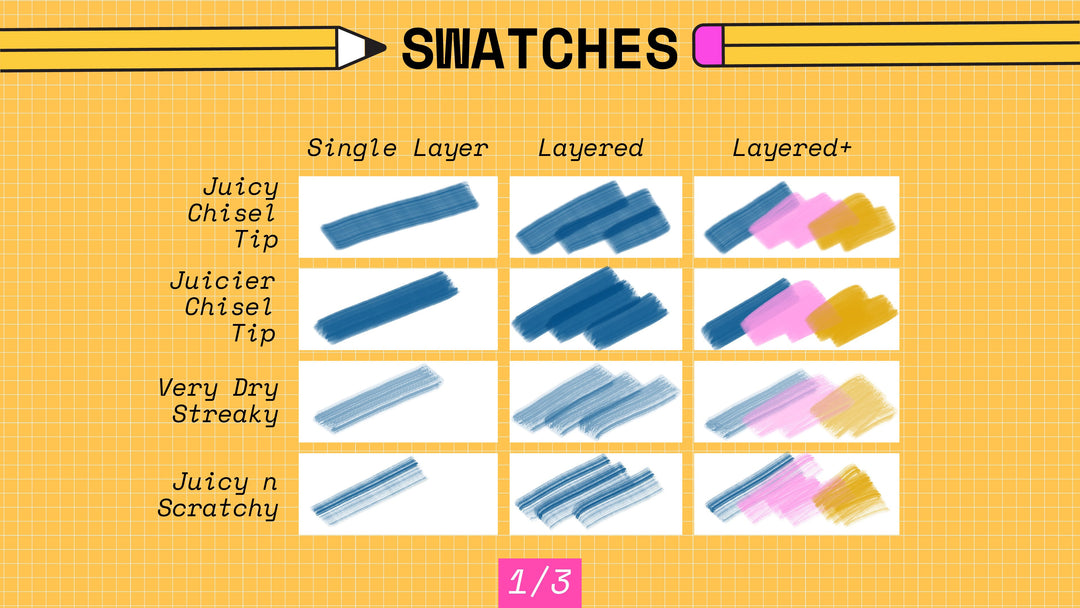
A marker's whole personality is how much ink is in it. A fresh one floods the page; a tired one streaks and skips. These 12 brushes are built from scans of real markers at every stage of that life. Fine tips from juicy to dry, chisel tips from saturated to streaky, and textured brushes for when you want the marker to look like it's been through a lot. Strokes build up when layered, the way real markers do. Instant download.
What's in the Set (12 Brushes)
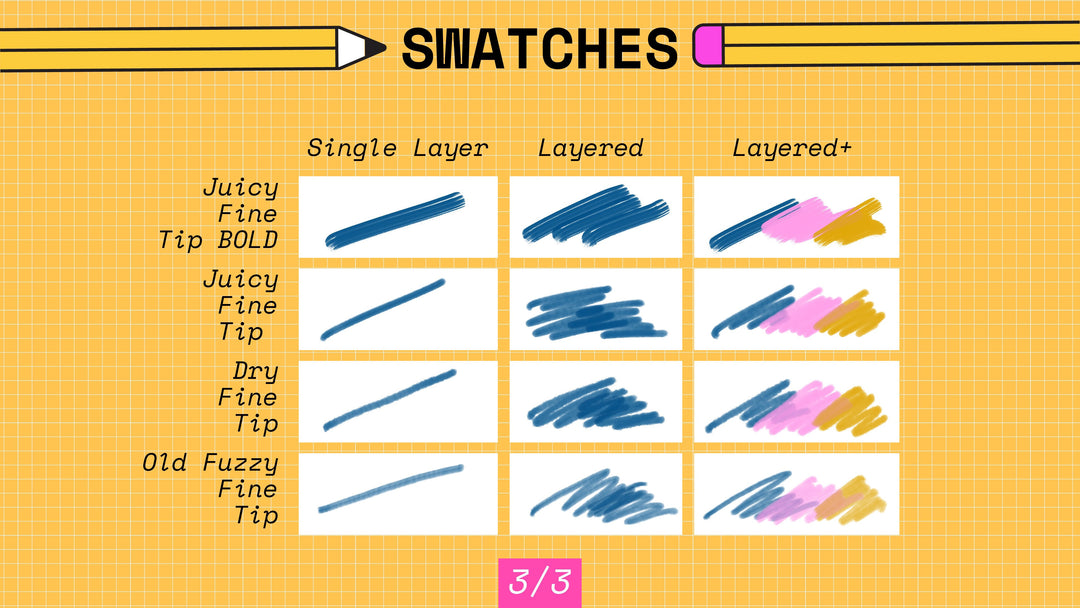
- Juicy Fine Tip BOLD. Solid, saturated line with bold coverage. For outlines and fills at full opacity.
- Juicy Fine Tip. Smooth, fine line for detailed work. Layers nicely for building color.
- Dry Fine Tip. A marker running low on ink. For rough sketches and textured linework.
- Old Fuzzy Fine Tip. Soft, fuzzy edge like a worn tip. For softer, more organic marks.
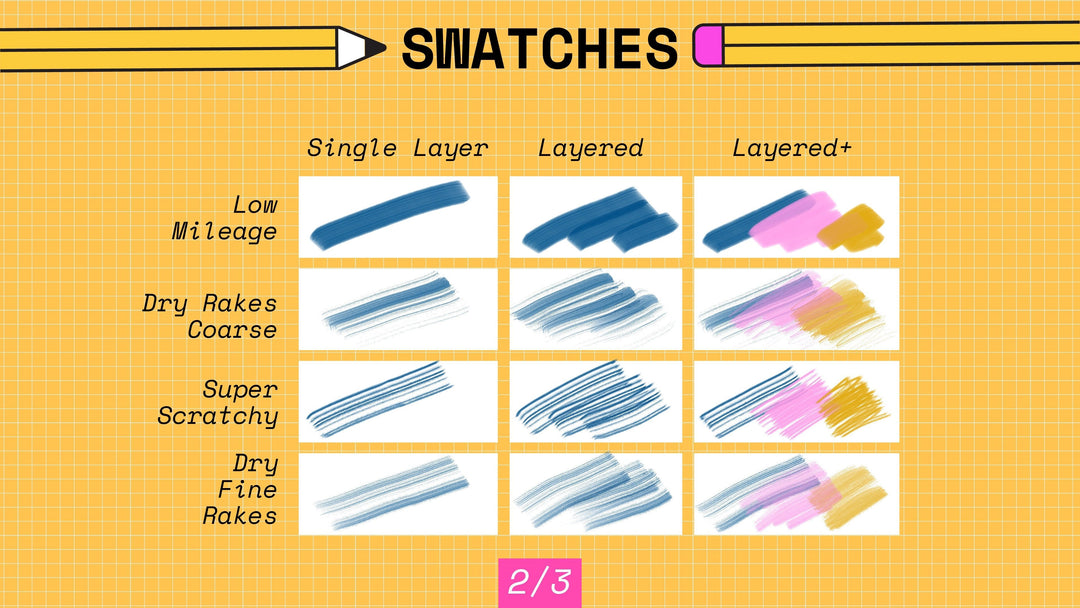
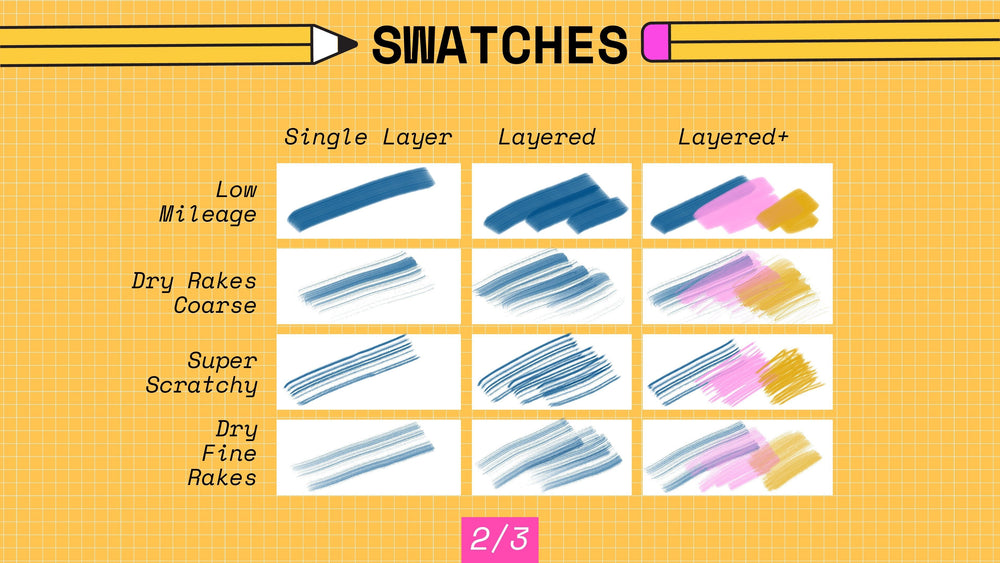
- Low Mileage. Consistent, solid stroke with subtle texture. The reliable workhorse.
- Dry Rakes Coarse. Coarse, textured strokes with visible streaks. For rough, expressive work.
- Super Scratchy. Gritty, scratchy texture for raw linework.
- Dry Fine Rakes. Fine textured lines with a raked quality. Detail that still has texture.
- Juicy Chisel Tip. Bold chisel strokes for calligraphy and expressive lettering.
- Juicier Chisel Tip. Even more saturated. Maximum ink, maximum impact.
- Very Dry Streaky. The running-out-of-ink effect. Texture and visual interest.
- Juicy n Scratchy. Saturated color with scratchy texture. Both at once.
What Are These Marker Brushes Good For?
Illustration, lettering, concept sketches, fashion and product drawing, and anywhere the marker look is the point. They're especially useful if you:
- Come from traditional markers and want layering that behaves the same way
- Letter with a chisel tip and want bold, expressive strokes
- Want dry, scratchy texture without switching to a pencil brush
Compatibility
- App: Procreate on iPad. Not compatible with Procreate Pocket, Photoshop, or Illustrator
- Device: all iPad sizes
- Stylus: Apple Pencil recommended; Apple Pencil Pro barrel roll supported
- File format: .brushset, imports directly into Procreate
- Delivery: instant download
How to Install
- Download the .brushset file on your iPad
- Tap it, and Procreate opens and imports it automatically
- Find the new set at the top of your Brushes panel
Licensing
Three options at checkout: Personal, Commercial, and Extended. Personal covers practice, personal projects, portfolio pieces, and social media. Commercial adds client work and selling what you make, up to 5,000 units per design. Extended removes the unit cap, for large production runs, fabric collections, or licensing your art to manufacturers. Started with Personal? You can upgrade anytime by paying the difference. Full terms are in the FAQ.
Questions People Ask
Do these layer like real markers?
Yes. Go over an area twice and it darkens, the same way a second pass of a real marker does. The juicy brushes saturate fastest; the dry ones stay translucent.
Can I use these brushes in work I sell?
Yes, with the Commercial or Extended license, chosen at checkout. Personal covers your own projects and portfolio.
Do I need an Apple Pencil Pro?
No. Every brush works with any Apple Pencil. Apple Pencil Pro adds barrel roll on the sets that support it.
What if the file won't import?
Email me with your order number. Digital sales are final, but a file that doesn't work is on me, and I'll get you a working one.
Digital product. Instant download, nothing ships. All sales are final, but if a file won't open or a brush won't import, email me and I'll make it right.
About the Artist. Esther Nariyoshi is a published illustrator based in the U.S. Her work draws on the three cultures she has lived in, and the brushes in this store start as real media in her studio.
Handmade digital assets by Esther Nariyoshi


 Back to Natural Media Procreate Brushes - Colored Pencil, Oil Pastel, Crayon


